

When a process takes too long, it rarely announces why. Time just drips away in unread emails, lost forms, idle queues, or approvals no one is accountable for.
That’s why time-based metrics matter. They don’t just tell you that work is slow. They show you where it slows down.
Cycle Time and Lead Time (The Difference That Prevents Bad Decisions)
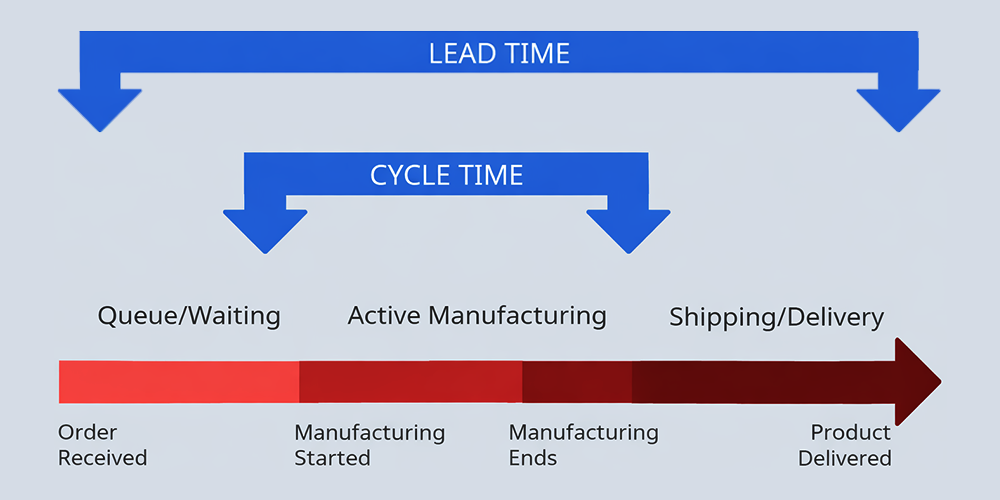
- Lead time is the customer-facing clock: from when a request is received (or an order is placed) to when the outcome is delivered.
- Cycle time is the work-facing clock: from when work actually starts to when the work is completed (the “in progress” window).
In many service and knowledge-work environments, cycle time sits inside lead time. Lead time includes the waiting before work begins, and any time after work is “done” but not yet delivered.
Tip: Definitions vary between teams and tools, so agree on your start and end points up front and keep them consistent.
What Is Cycle Time?
Cycle time measures how long it takes your team to complete the work once it starts. It reflects process capability and capacity: how fast work moves when it is in motion.
Cycle time can still include pauses during execution (for example, waiting on clarification mid-process). What it does not include is the pre-start queue – that’s lead time.
Why Cycle Time Matters
- It reveals bottlenecks inside the work, not just around it.
- It improves predictability, because stable cycle times make planning and SLAs more reliable.
- It supports Lean improvement by identifying delays, rework, and unnecessary hand-offs while work is underway.
- It strengthens customer experience indirectly, because reducing cycle time often reduces lead time too (especially when queues are driven by slow throughput).
Signs You’ve Got a Cycle Time Problem
- Tasks sit “in progress” for days with no clear reason.
- Work moves repeatedly between people for clarification or rework.
- Approvals happen late, inconsistently, or only after escalation.
- Turnaround time varies wildly for the same type of request.
- Staff morale drops because everyone is “busy” but little finishes.
How to Measure It Effectively
- Define the start and end points: Decide exactly when work is considered “started” (for example, first touch by a processor, or when a case moves into In Progress).
- Track each step separately: Measure cycle time per stage (initiation, review, approval, fulfilment). That’s how you find the constraint.
- Use the median, not only the average: A handful of outliers can distort the mean. The median shows the typical experience.
- Visualise the flow: A simple diagram helps teams see what’s happening: queue time, active work time, and delivery time as distinct segments.
Example: Onboarding a New Supplier
Let’s say the end-to-end lead time is 15 working days.
When you separate the cycle time (active work), you get:
- Procurement active work: 3 days
- Legal active work: 4 days
- Final setup active work: 2 days
That’s 9 days of active work inside 15 days of lead time, which indicates approximately six days of waiting (queues, hand-offs, missing information, or scheduling delays).
If Legal accounts for the biggest share of active time, it’s a strong candidate for the constraint. You can now ask better questions: is it workload, missing information, unclear standards, or repeated rework?
How FlowCentric Helps Improve Cycle Time
FlowCentric can help teams run cycle time management as an operational discipline, rather than a spreadsheet exercise, by enabling (depending on configuration and reporting set-up):
- Timestamped stages so you can measure cycle time by step.
- Operational visibility into items in progress, overdue steps, and workload.
- Alerts and escalations when steps exceed agreed thresholds.
- Historical reporting to show trends and support improvement with evidence.
Cycle time is more than a stopwatch; it’s a diagnostic tool. If you want faster, more predictable operations, measure what happens while work is actually underway – then remove the friction that keeps it stuck.
Contact FlowCentric to take your business from #ChaosToClarity.
